TL;DR:
WordPress security has become a race against the clock. AI is helping attackers move faster, vulnerabilities are being exploited within hours of disclosure, and nearly half may have no patch available when they become public. The best defense is a layered strategy: reduce unnecessary plugins, patch quickly, use WordPress-aware protection, secure accounts, maintain tested backups, monitor continuously, and make sure someone is responsible for responding.
Right now, as you read this, there is a very good chance automated systems are probing your WordPress site.
They aren’t necessarily targeting you. Nobody has to know who owns your company, what you sell, how much revenue you make, or whether your website seems important enough to hack.
That’s not how most of these attacks work. And understanding that distinction is becoming essential to WordPress security.
Automated scanners crawl the web continuously looking for websites running vulnerable software, exposed login pages, outdated plugins, weak passwords, known exploits, and other opportunities. If they find something they recognize, they try it.
And WordPress is a particularly attractive target simply because of its scale. As of September 2026, WordPress powers about 40 percent of all websites tracked by W3Techs.
That creates an enormous, relatively standardized attack surface.
In this article

How serious is the problem?
Wordfence, which gathers attack telemetry from more than 5 million protected WordPress websites, reported blocking 9.1 billion web application firewall attacks and 13.8 billion brute-force attacks in the fourth quarter of 2025 alone.
So when we say your WordPress website is being attacked, we don’t mean there is necessarily a person in a dark room specifically trying to break into your company’s website.
Most of the time, the attacker doesn’t know who you are. And that may actually be the more unsettling part.
The five-hour window that broke the old security playbook
For years, WordPress security best practices sounded something like this:
Keep WordPress updated. Keep your plugins updated. Install security patches promptly.
That’s still good advice. It just isn’t enough anymore.
Patchstack’s State of WordPress Security in 2026 examined how quickly vulnerabilities disclosed during 2025 began seeing real-world exploitation.
For the vulnerabilities responsible for roughly 95 percent of the exploitation activity Patchstack observed, the weighted median time from disclosure to the first exploit attempt was just five hours.
Take a look at that number again — not five days. Five hours. That fundamentally changes what “prompt patching” means.
If a serious vulnerability is publicly disclosed at 9 a.m. and someone plans to update the website after dinner, automated exploitation may have been underway for hours before they ever log in to WordPress.
Waiting until Friday to run plugin updates isn’t a security process anymore.
And there is another problem.
Patchstack found that 46 percent of vulnerabilities disclosed during 2025 had not been patched by the developer at the time they became public.
That means that in nearly half of those cases, clicking “Update” couldn’t have protected the site because there was no security update available yet.
The old model assumed something like this:
Vulnerability discovered → patch released → website updated → problem solved.
The reality is increasingly:
Vulnerability discovered → vulnerability becomes exploitable → attacks begin → patch may arrive later.
And this isn’t solely a WordPress problem. Mandiant reported in its 2026 threat research that the mean time to exploit vulnerabilities had fallen to about -7 days (negative 7 days) across the broader security landscape. In other words, exploitation is increasingly happening before a patch is available.
Security teams now have to plan for the period when they know a vulnerability exists but cannot simply update their way out of it.
Where AI changes the equation
It would be easy to say, “AI caused all of this.” It didn’t.
Automated hacking existed long before ChatGPT. Vulnerability scanners existed. Botnets existed. Attackers automated reconnaissance, credential stuffing, brute-force attacks, and exploit delivery years before generative AI became mainstream.
What AI changes is speed, accessibility, and scale.
Google Threat Intelligence Group expects AI to increasingly accelerate reconnaissance, vulnerability discovery, and exploit development. These are the steps attackers have traditionally needed to perform before launching an attack.
Researchers have already shown why that matters.
In a 2024 study of 15 reproducible real-world vulnerabilities, researchers found that an LLM-based agent given the public CVE description could successfully exploit 87 percent of those vulnerabilities under their test conditions. Without the vulnerability description, its success rate dropped dramatically. The study was small and shouldn’t be interpreted as “AI can hack 87 percent of websites,” but it demonstrated something important: once information about a vulnerability becomes public, capable AI systems can help turn that information into working exploitation much more efficiently.
More recent cybersecurity benchmarks have continued examining how effectively AI agents can exploit real-world vulnerabilities. Results vary substantially depending on the model, vulnerability, environment, and amount of information available, but the overall trajectory is clear: AI is becoming increasingly capable of performing work that once required substantially more manual security expertise.
That lowers the cost of attacking at scale.
A public vulnerability disclosure no longer has to be read, understood, reverse-engineered, and manually translated into attack code by every person who wants to exploit it.
AI can assist with understanding the vulnerable code, interpreting technical documentation, generating scripts, adapting code, troubleshooting failed attempts, and automating pieces of the exploitation process.
That means defenders should assume the time between “someone knows this vulnerability exists” and “someone is trying to exploit it everywhere” will continue to shrink.
AI is creating problems on the defensive side, too
There is another, less obvious effect.
AI isn’t just helping find vulnerabilities. It’s also producing enormous amounts of code.
That includes WordPress code.
Developers can now ask an AI coding assistant to create a custom plugin, modify a theme, write an integration, add an API endpoint, build an admin interface, or connect WordPress to another system in minutes.
That can be incredibly useful.
It can also create a security problem when the person using the AI doesn’t have enough development experience to recognize insecure code.
AI can produce code that works perfectly well in a demo while mishandling authentication, permissions, user input, file uploads, database queries, or sensitive information.
Working code and secure code are not the same thing.
Patchstack reported another AI-related problem in 2025: a significant increase in low-quality, incomplete, or invalid AI-generated vulnerability reports. Security teams aren’t simply dealing with more vulnerabilities; they are having to separate real security findings from a growing amount of automated noise.
In other words, AI can accelerate both sides of the equation.
- It can help defenders identify vulnerabilities faster.
- It can help attackers analyze them faster.
- It can help developers create software faster.
- And it can help developers create insecure software faster.
Speed isn’t inherently good or bad. But it leaves much less room for sloppy security practices.
The uncomfortable math of WordPress plugins
Here’s the good news:
WordPress core isn’t usually the biggest problem.
In Patchstack’s analysis of 2025, 91 percent of newly disclosed WordPress vulnerabilities were found in plugins, while another nine percent were in themes. Only six vulnerabilities were reported in WordPress core in its annual analysis, and Patchstack categorized those as low priority.
The problem is the enormous ecosystem built around WordPress.
A business website might have plugins for:
- forms
- SEO
- analytics
- redirects
- caching
- backups
- ecommerce
- accessibility
- spam protection
- page building
- custom fields
- events
- memberships
- integrations
- security
Twenty or 30 plugins on a business website isn’t unusual.
Every one of those plugins adds functionality.
Every one also adds code that has to be maintained, monitored, updated, and trusted.
Patchstack recorded 11,334 new WordPress ecosystem vulnerabilities in 2025. That’s a 42 percent increase over 2024. The number of vulnerabilities it classified as highly exploitable increased 113 percent.
That does not mean every plugin is insecure, or that every WordPress site is destined to be compromised. It means attack surface matters.
The more unnecessary software a website depends on, the more opportunities there are for something to go wrong.
Your hosting company isn’t necessarily solving this for you
Many business owners assume that because they pay for managed WordPress hosting, the host is preventing these attacks.
Good hosting absolutely matters. But hosting alone is not a complete WordPress security strategy.
Patchstack tested common defenses at popular hosting providers against WordPress vulnerability attacks. In one test focused specifically on known exploited WordPress vulnerabilities, traditional defenses blocked only 12 percent of the attacks. A broader test that included more generic vulnerabilities produced a 26 percent block rate.
Part of the problem is context.
A generic firewall can recognize many obviously malicious requests, but some WordPress vulnerabilities depend on understanding the application itself: which plugin is installed, what version it is running, whether someone is authenticated, what permissions they have, and whether a particular request should be allowed.
That’s why modern WordPress security increasingly depends on WordPress-specific threat intelligence and application-level protection.
So what actually works in a five-hour world?
There isn’t one WordPress security plugin, setting, or service that makes this problem disappear.
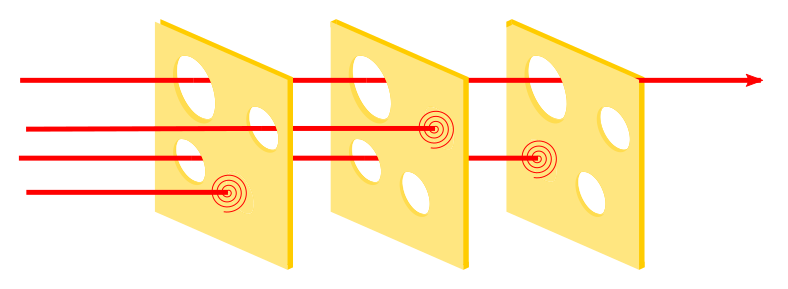
Modern website security requires layers. It’s kind of like a Swiss cheese approach to security.
1. Reduce your attack surface
Start with the least glamorous security task imaginable:
Delete things you don’t need.
Not deactivate. Delete.
Remove unused plugins, abandoned themes, old integrations, staging tools, temporary utilities, and anything else that no longer has a legitimate purpose.
Also pay attention to whether the software you use is actively maintained. WordPress itself recommends keeping WordPress, plugins, and themes current and choosing components that continue to receive updates.
Every component you remove is one less component someone has to monitor.
2. Build an update strategy, not an “update day”
Automatic updates can dramatically shorten your exposure to known vulnerabilities, and WordPress has supported automatic updating for years.
But “turn on automatic updates for absolutely everything” isn’t always a responsible recommendation for a business-critical website.
Some updates break integrations, layouts, checkout processes, forms, or custom functionality.
The better approach is to determine which components can safely update automatically, which require testing, and what happens when a high-risk security update needs to bypass the normal maintenance schedule.
The important part is that somebody owns the decision.
A security alert should not sit unnoticed in an inbox for four days because everyone assumed someone else was handling it.
3. Use WordPress-aware vulnerability protection
Traditional firewall protection is useful, but the shrinking patch window makes application-specific protection increasingly important.
A WordPress-aware web application firewall or vulnerability mitigation service can sometimes block exploitation of a known vulnerability before the software developer releases a permanent fix.
This is often called virtual patching.
In a world where 46 percent of vulnerabilities were unpatched at disclosure, that gap matters.
4. Protect accounts, not just software
Not every attack requires an exotic software vulnerability.
Attackers also use stolen passwords, credential stuffing, phishing, and brute-force login attempts.
- Require strong unique passwords.
- Enable multi-factor authentication, especially for administrator accounts.
- Remove accounts belonging to former employees and vendors.
- Give users only the permissions they actually need.
An administrator account shouldn’t be the default simply because it is convenient.
5. Maintain backups you can actually restore
Having a backup checkbox enabled somewhere in your hosting dashboard is not a recovery plan.
Backups should be automatic, retained separately from the live website, and periodically tested.
Know:
- what gets backed up
- how often
- how long backups are retained
- whether they are stored off-site
- who can initiate a restore
- approximately what would be lost between the last backup and an incident
The first time you learn how your backup system works should not be while your website is compromised.
6. Monitor continuously
Security doesn’t end after an update.
Continuous monitoring is increasingly one of the most important parts of a modern WordPress security strategy, because exploitation can begin long before someone logs in to perform routine maintenance.
Watch for vulnerability alerts, file changes, unusual administrator accounts, unexpected plugins, suspicious traffic, failed login spikes, malware indicators, and other anomalous behavior.
Modern attackers increasingly try to establish persistence so they can regain access even after obvious malware is removed. Patchstack’s 2026 report describes a rise in multi-stage attacks designed to maintain longer-term footholds on compromised websites.
Cleaning the visible infection without understanding how the attacker got in can simply start the cycle over again.
7. Know who owns website security
This may be the most important step.
For every business website, someone should be able to answer:
- Who receives vulnerability alerts?
- Who decides whether something needs to be patched immediately?
- Who checks that backups are working?
- Who responds if the site is compromised?
- Who knows which plugins and integrations the website depends on?
If the answer is “we’ll figure that out when something happens,” then the security plan is incomplete.
Frequently asked questions about WordPress security
Is WordPress secure?
WordPress itself is generally considered secure when it is properly maintained. The larger risk often comes from the ecosystem surrounding it, particularly plugins and themes. In Patchstack’s 2025 data, 91 percent of newly disclosed WordPress vulnerabilities were found in plugins. Good WordPress security therefore requires more than keeping WordPress core updated; it also means carefully managing every component added to the site.
Why do hackers attack small WordPress websites?
Most attacks aren’t specifically aimed at a particular business. Automated scanners continuously search the internet for websites running known vulnerable software, weak credentials, exposed login pages, and other opportunities. A small business can be attacked for the same reason a large organization can: a bot found the site and detected something it knows how to exploit.
How quickly are WordPress vulnerabilities exploited?
In Patchstack’s 2026 security report, the weighted median time between public disclosure and the first exploit attempt was just five hours for the vulnerabilities responsible for most observed exploitation activity. That means businesses can no longer assume they have several days to respond after a serious vulnerability becomes public.
How is AI affecting WordPress security?
AI is accelerating work on both sides of cybersecurity. It can help security teams analyze vulnerabilities and identify threats, but it can also help attackers understand vulnerable code, develop scripts, troubleshoot exploits, and automate parts of an attack. AI coding tools can also introduce risk when developers use generated code without having the expertise to evaluate whether that code is secure.
AI didn’t create the WordPress security problem, but it is helping compress the amount of time between vulnerability discovery and potential exploitation.
Are WordPress plugins a security risk?
Plugins aren’t inherently unsafe, but every plugin adds code that must be maintained, monitored, and kept secure. An abandoned, outdated, or vulnerable plugin can create an entry point even if the rest of the website is properly maintained.
A strong WordPress security strategy therefore includes regularly reviewing installed plugins and deleting anything the site no longer needs—not simply deactivating it.
Are automatic WordPress updates enough to keep a website secure?
No. Automatic updates can reduce the time a site remains exposed after a security patch becomes available, but they don’t solve every problem. Some vulnerabilities are disclosed before a patch exists, and some plugin updates can break important website functionality.
Businesses need an update strategy that determines what can update automatically, what requires testing, and how critical security vulnerabilities will be handled when they require immediate action.
Does managed WordPress hosting protect my website from attacks?
Managed hosting can provide important security protections, but hosting should be considered one layer of a broader WordPress security strategy. Application-specific vulnerabilities may require protections that understand WordPress itself, including the plugins and versions installed on the site.
Businesses should know what their hosting provider protects, what it monitors, how backups work, and which security responsibilities still belong to the website owner or maintenance team.
What are the most important WordPress security practices for a business website?
There isn’t one tool that can secure a WordPress site by itself. A strong approach combines several layers:
Remove unnecessary plugins and themes.
Keep WordPress, plugins, and themes updated.
Use strong, unique passwords and multi-factor authentication.
Limit administrator access.
Use WordPress-aware firewall and vulnerability protection.
Maintain automatic, off-site backups and test the restore process.
Monitor the website for vulnerabilities and suspicious activity.
Establish who is responsible for responding to security alerts and incidents.
The most important shift is treating WordPress security as an ongoing operational responsibility rather than something that gets checked during occasional website maintenance.
The WordPress security model has changed
Five years ago, a reasonable WordPress maintenance process could revolve around periodically logging in, installing updates, checking that the website still worked, and moving on.
That approach was built for a slower threat environment.
Today’s WordPress ecosystem operates at machine speed.
- Automated systems discover websites.
- Security researchers discover vulnerabilities.
- Attackers monitor disclosures.
- Bots test exploits.
AI can increasingly assist with analyzing vulnerabilities, generating code, troubleshooting attacks, and scaling work that previously required much more human effort.
The answer isn’t panic. And it isn’t installing six more security plugins.
It is accepting that WordPress security is now an ongoing operational responsibility rather than a periodic maintenance task.
Your website needs fewer unnecessary dependencies.
- It needs fast vulnerability intelligence.
- It needs protection during the window when a vulnerability exists but a patch does not.
- It needs account security.
- It needs reliable backups.
And most importantly, it needs someone paying attention. Because the bots already are.
Need help with a compromised WordPress site?
If your WordPress site has been hacked, infected with malware, or is behaving in ways you can’t explain, Standard Beagle can help.
We have experience investigating WordPress security incidents, cleaning compromised sites, removing malicious code, identifying likely points of entry, restoring functionality, and putting stronger protections in place to reduce the risk of it happening again.
The sooner a compromised site is assessed, the better. Contact Standard Beagle to get help securing and cleaning up your WordPress website.

About the Author
Andy Brummer is the Co-Founder and Lead Software Architect of Standard Beagle, where he helps B2B SaaS and health tech companies untangle and turn strategy into reality.